At Flex 360, someone asked me where they could find out how to use our Flex 4 SDKs with Flex Builder 3 because Builder 4
isn’t available to the public. This is pretty easy thanks to the multiple SDK support in Builder. So, as promised to a customer,
here are the instructions for using Flex Builder 3 with the Flex 4 Gumbo SDK.
1) Download the Gumbo SDK – Go to opensource.adobe.com.
2) Unzip the flex_sdk_4.zip to some location on your hard drive. For the purposes of this tutorial, we’ll download it to
C:/Flex4/trunk/7069
3) Open up Flex Builder 3 and create a new Flex project.
4) Right-click on the project and select the ‘Properties’ option. This should open the Properties panel.
5) From the left hand menu, select ‘Flex Compiler’ to view the Flex Compiler properties
6) In the Flex Compiler properties view, click on the link ‘Configure Flex SDKs…’

7) You should be in the ‘Installed Flex SDKs’ view. click on the button ‘Add’.
8) In the resulting dialog, browse to the location that you installed the SDK (from step #2). Then, click ‘OK’.
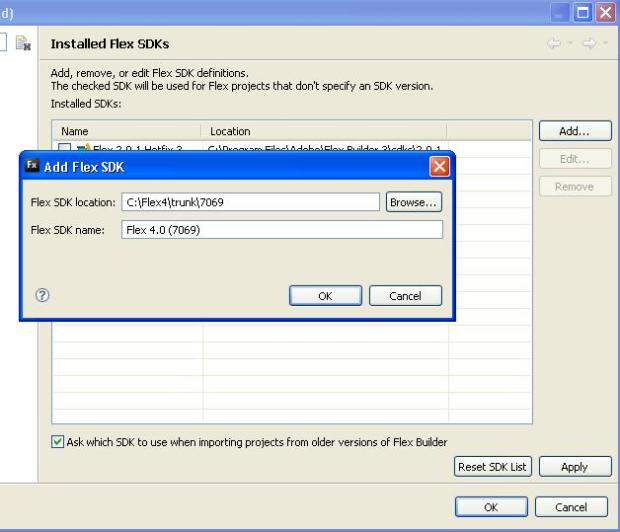
The Flex 4 Gumbo SDK should now be added to the list of SDKs available for you to use for this project.
9) Press ‘OK’ in the “Installed Flex SDKs” dialog bringing you back to the main ‘Flex Compiler’ properties
dialog.
10) In the ‘Flex Compiler’ dialog, select the radio button for ‘Use a specific SDK’ and
select the Flex 4 SDK that you added.
11) In the ‘Flex Compiler’ dialog, for ‘Require Flash Player version:’, enter 10.0.0. Flex 4
will only support Flash Player 10 content. If you compile to player 9, you will get an error.
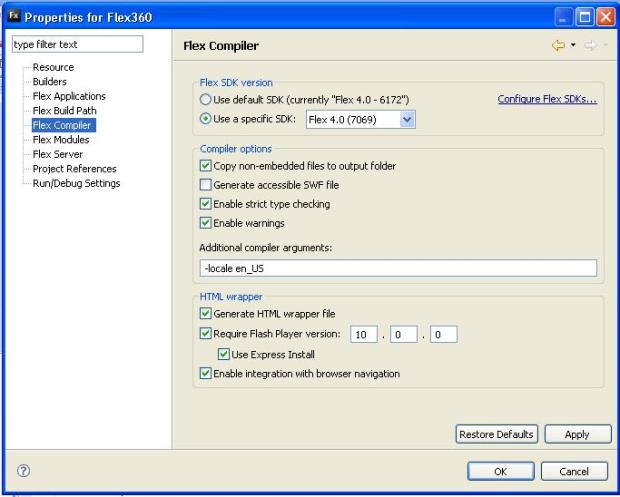
12) Press ‘OK’ to close your dialog.
13) Note that when you create new mxml files for this project, the default tags will still be the tag
with the old namespace. You will need to manually change the mxml to use our new Spark Application tag and the new namespaces.
To get started with your first spark application. Feel free to use the sample below which is a simple spark application using the
3 new namespaces and some spark components (s:) along with halo components (mx:).
Note: If you try to compile a Flex 3 application with Flex 4, be aware of some of the migration issues that you’ll face that I mentioned
in a previous post.
Have fun playing with Spark!
Download Sample Spark App: firstSample4App.mxml

 Butterflies and Bugs
Where is the sample application? I’m having namespace troubles.
@Tyler – Sorry about that, I have posted the sample Application now.
Thank you so much, while I had already discovered a similar example with the above namespacing. I had spent hours trying to get simple “Hello World!” to work as almost all the examples were old Summer 2008/Winter 2009 examples.
🙂
I done same setup in my flex 3 builder for flex 4 sdk but i m not able to view my controls and components in design view can anyone help out how to use controls in design view with flex 4 sdk configured.
@Pravin: hmm.. I’m thinking there isn’t support for Design View for Flex 4 components with Flex Builder 3. (just my guess). Maybe someone else out there can help…
Thanks jlafferty for the reply,
i will find out some other alternate for this but thanks a lot for providing such a nice tutorial.
Thanks
Al done . When I run the app. I get ‘ This file cannot be launched error.’
hi your article is fine,but i had doubt regarding the compilation of sdk3 project with sdk4 project ,plzzzzzzzzz…….
[…] From: https://butterfliesandbugs.wordpress.com/2009/05/21/using-flex-builder-3-with-the-flex-4-sdk/ […]
Hi there,
Just a question, do you able to create flex library project using Flex Builder 3 and Flex 4 SDK(either 4.1 or Hero)? Mine give following error: C:\Program Files\Adobe\Flex Builder 3\sdks\4.1.0\frameworks\libs\player\9.0\playerglobal.swc
I’ve tried copy over the 9.0 from previous SDK(3.2) but no luck compiling it.
But compiling a flex project it’s not a problem at all since I can specify which Flash Player i’m targeting to.
Please let me know if anyone able to create flex library project in Flex Builder 3 using Flex 4 SDK(4.1/Hero).
Regards,
Nas
@Nasrul: For Flex 4.1 projects, you have to target Flash player 10 and not 9. So, in your project’s properties, be sure you are targeting a minimum of Flash Player 10. You should not copy the player 9 swc from the 3.x SDKs.
@jlafferty: Yeah..that’s correct. In Flex Builder 3, when creating Flex Library Project, you need to modify the .actionScriptProperties file, change the player to 10.0.0. That will fix the issue.
p/s: FB3 doesn’t have targeting Flash Player form when you click on properties of the particular project(under Flex Compile) – so need to manually change. 🙂
Regards,
Nas
Thanks very much …. It solved my problems (need to work on an existing FB4 within FB3 IDE) ….